
OEM#: TLNETCARDNew OEM Original Outright
UPS WEB MANAGEMENT ACCESSORY CARD SNMP REMOTE MONITORING by Tripp Lite
Your price:
$603.50 each $671.00 Savings: $67.50 (10%)

OEM#: TLNETCARDUPS WEB MANAGEMENT ACCESSORY CARD SNMP REMOTE MONITORING by Tripp Lite
New OEM Original Outright
Your price:
$603.50 each
$671.00 Savings: $67.50 (10%)
SNMP/Web/Modbus Management Accessory Card for compatible Tripp Lite UPS Systems
Asset Information
1-Year Limited Warranty
Are you an existing customer? Sign in to access your account.
ADD TO LIST
Product Overview
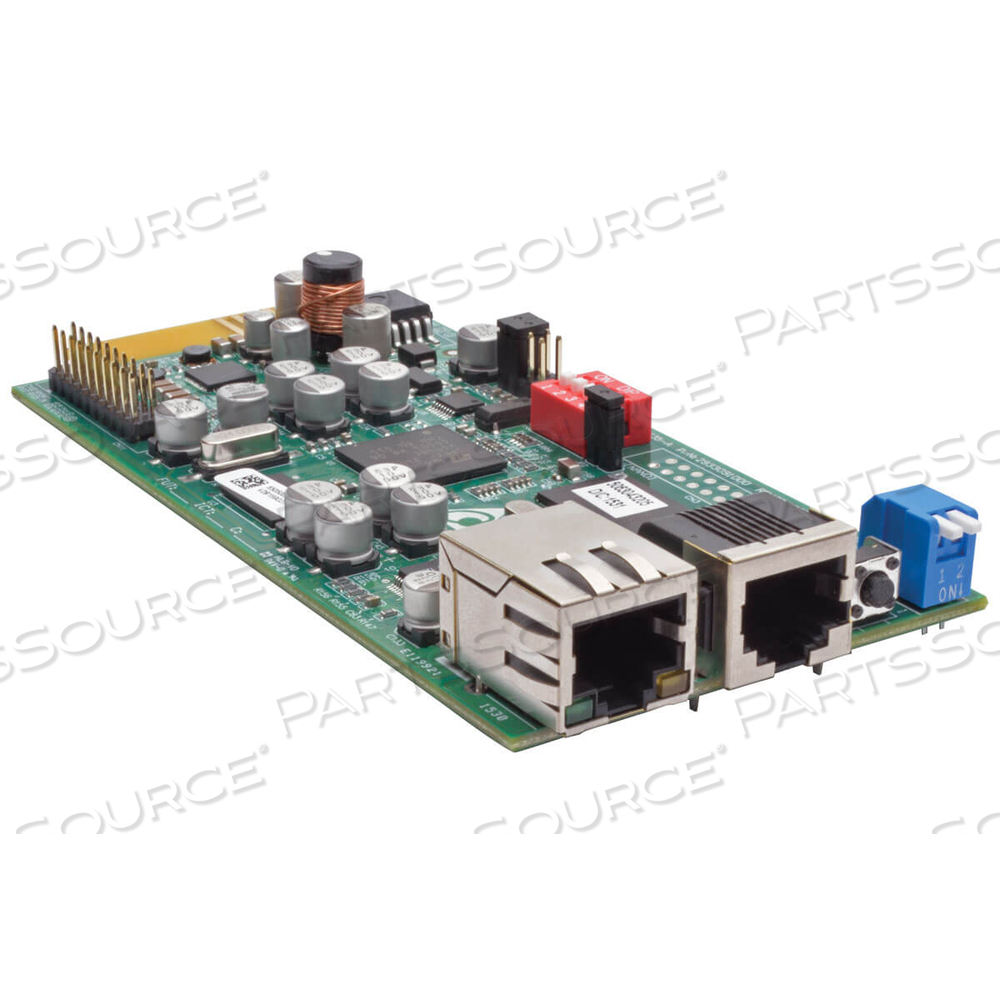
The TLNETCARD turns a compatible* SmartPro or SmartOnline UPS with an accessory slot into a device you can manage on your network. By inserting the TLNETCARD into the slot and using an SNMP network management platform, web browser, Modbus TCP, SSH or Telnet, you can monitor and control the UPS in your server room, data center or network closet. The TLNETCARD's intuitive web interface does not require the Java Runtime Environment (JRE)Keep an eye on site electrical data, UPS device status and logged power-related events, such as blackouts, brownouts and overvoltages. Reboot locked network equipment remotely without disrupting power to other devices when using the TLNETCARD with controllable outlets or remotely switchable outlets available on select Tripp Lite UPS systems. Tiered access allows three levels of permissions to be assigned to users for monitoring or controlling the UPS. If an electrical or UPS-related problem occurs on-site, you’ll be notified immediately via email or SNMP trap. The TLNETCARD lets you configure and schedule automatic UPS-driven actions, perform UPS-related tests and shutdowns, upgrade firmware and upload configurations from the web interface. Multiple protocols are supported, including IPv6, HTTP, HTTPS, SMTP, SNMPv1, SNMPv3, Modbus TCP, Telnet, SSH, FTP, DHCP, BOOTP, and SCP. DHCP/manual configuration support enables network settings to be assigned automatically or manually.* See Resources section for a list of compatible devices
- System Requirements:
• Compatible* Tripp Lite SmartPro or SmartOnline UPS system
• Web browser or terminal emulator* See Resources section for a list of compatible devices
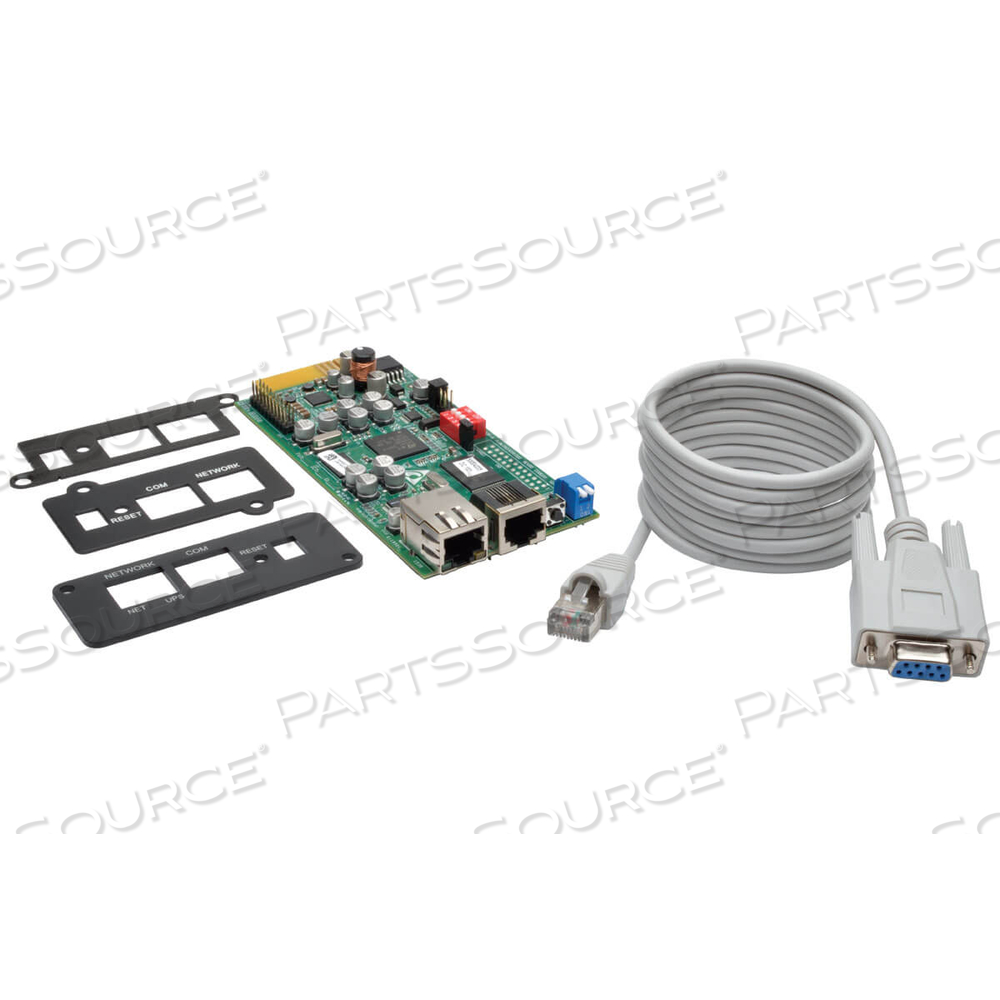
- Package Includes:
• TLNETCARD Web Management Accessory Card
• Configuration cable (7315E1)
• Faceplates (x3)
• Owner's Manual
Features
- Allowsmass configuration and updating of multiple units using TLNET Configurator utility
- Enablesremote UPS management from virtually anywhere in the world
- Logspower events, alerts and electrical data
- Sendsuser-configurable alerts via SNMP or email
- Web interface does not require the Java Runtime Environment * See Resources section for a list of compatible devices
Technical Specs
P/N: TLNETCARD Key Specs
Item
UPS WEB MANAGEMENT ACCESSORY CARD SNMP REMOTE MONITORING
OEM
Tripp Lite
OEM #
TLNETCARD
Condition
New OEM Original
Returnable
No
Warranty
Other (See Notes)
Cabling Type
Ethernet 10Base-T, Ethernet 100Base-TX
Data Link Protocol
10Mb LAN, 100Mb LAN
Data Transfer Rate
100 Mbps
Form Factor
Plug-in module
Network / Transport Protocol
SMTP, FTP, DHCP
The TLNETCARD turns a compatible* SmartPro or SmartOnline UPS with an accessory slot into a device you can manage on your network. By inserting the TLNETCARD into the slot and using an SNMP network management platform, web browser, Modbus TCP, SSH or Telnet, you can monitor and control the UPS in your server room, data center or network closet. The TLNETCARD's intuitive web interface does not require the Java Runtime Environment (JRE)Keep an eye on site electrical data, UPS device status and logged power-related events, such as blackouts, brownouts and overvoltages. Reboot locked network equipment remotely without disrupting power to other devices when using the TLNETCARD with controllable outlets or remotely switchable outlets available on select Tripp Lite UPS systems. Tiered access allows three levels of permissions to be assigned to users for monitoring or controlling the UPS. If an electrical or UPS-related problem occurs on-site, you’ll be notified immediately via email or SNMP trap. The TLNETCARD lets you configure and schedule automatic UPS-driven actions, perform UPS-related tests and shutdowns, upgrade firmware and upload configurations from the web interface. Multiple protocols are supported, including IPv6, HTTP, HTTPS, SMTP, SNMPv1, SNMPv3, Modbus TCP, Telnet, SSH, FTP, DHCP, BOOTP, and SCP. DHCP/manual configuration support enables network settings to be assigned automatically or manually.* See Resources section for a list of compatible devices
- System Requirements:
• Compatible* Tripp Lite SmartPro or SmartOnline UPS system
• Web browser or terminal emulator* See Resources section for a list of compatible devices
- Package Includes:
• TLNETCARD Web Management Accessory Card
• Configuration cable (7315E1)
• Faceplates (x3)
• Owner's Manual
Product Overview
The TLNETCARD turns a compatible* SmartPro or SmartOnline UPS with an accessory slot into a device you can manage on your network. By inserting the TLNETCARD into the slot and using an SNMP network management platform, web browser, Modbus TCP, SSH or Telnet, you can monitor and control the UPS in your server room, data center or network closet. The TLNETCARD's intuitive web interface does not require the Java Runtime Environment (JRE)Keep an eye on site electrical data, UPS device status and logged power-related events, such as blackouts, brownouts and overvoltages. Reboot locked network equipment remotely without disrupting power to other devices when using the TLNETCARD with controllable outlets or remotely switchable outlets available on select Tripp Lite UPS systems. Tiered access allows three levels of permissions to be assigned to users for monitoring or controlling the UPS. If an electrical or UPS-related problem occurs on-site, you’ll be notified immediately via email or SNMP trap. The TLNETCARD lets you configure and schedule automatic UPS-driven actions, perform UPS-related tests and shutdowns, upgrade firmware and upload configurations from the web interface. Multiple protocols are supported, including IPv6, HTTP, HTTPS, SMTP, SNMPv1, SNMPv3, Modbus TCP, Telnet, SSH, FTP, DHCP, BOOTP, and SCP. DHCP/manual configuration support enables network settings to be assigned automatically or manually.* See Resources section for a list of compatible devices
- System Requirements:
• Compatible* Tripp Lite SmartPro or SmartOnline UPS system
• Web browser or terminal emulator* See Resources section for a list of compatible devices
- Package Includes:
• TLNETCARD Web Management Accessory Card
• Configuration cable (7315E1)
• Faceplates (x3)
• Owner's Manual
Features
- Allowsmass configuration and updating of multiple units using TLNET Configurator utility
- Enablesremote UPS management from virtually anywhere in the world
- Logspower events, alerts and electrical data
- Sendsuser-configurable alerts via SNMP or email
- Web interface does not require the Java Runtime Environment * See Resources section for a list of compatible devices
Technical Specs
P/N: TLNETCARD Key Specs
Item
UPS WEB MANAGEMENT ACCESSORY CARD SNMP REMOTE MONITORING
OEM
Tripp Lite
OEM #
TLNETCARD
Condition
New OEM Original
Returnable
No
Warranty
Other (See Notes)
Cabling Type
Ethernet 10Base-T, Ethernet 100Base-TX
Data Link Protocol
10Mb LAN, 100Mb LAN
Data Transfer Rate
100 Mbps
Form Factor
Plug-in module
Network / Transport Protocol
SMTP, FTP, DHCP
The TLNETCARD turns a compatible* SmartPro or SmartOnline UPS with an accessory slot into a device you can manage on your network. By inserting the TLNETCARD into the slot and using an SNMP network management platform, web browser, Modbus TCP, SSH or Telnet, you can monitor and control the UPS in your server room, data center or network closet. The TLNETCARD's intuitive web interface does not require the Java Runtime Environment (JRE)Keep an eye on site electrical data, UPS device status and logged power-related events, such as blackouts, brownouts and overvoltages. Reboot locked network equipment remotely without disrupting power to other devices when using the TLNETCARD with controllable outlets or remotely switchable outlets available on select Tripp Lite UPS systems. Tiered access allows three levels of permissions to be assigned to users for monitoring or controlling the UPS. If an electrical or UPS-related problem occurs on-site, you’ll be notified immediately via email or SNMP trap. The TLNETCARD lets you configure and schedule automatic UPS-driven actions, perform UPS-related tests and shutdowns, upgrade firmware and upload configurations from the web interface. Multiple protocols are supported, including IPv6, HTTP, HTTPS, SMTP, SNMPv1, SNMPv3, Modbus TCP, Telnet, SSH, FTP, DHCP, BOOTP, and SCP. DHCP/manual configuration support enables network settings to be assigned automatically or manually.* See Resources section for a list of compatible devices
- System Requirements:
• Compatible* Tripp Lite SmartPro or SmartOnline UPS system
• Web browser or terminal emulator* See Resources section for a list of compatible devices
- Package Includes:
• TLNETCARD Web Management Accessory Card
• Configuration cable (7315E1)
• Faceplates (x3)
• Owner's Manual
Product Overview
The TLNETCARD turns a compatible* SmartPro or SmartOnline UPS with an accessory slot into a device you can manage on your network. By inserting the TLNETCARD into the slot and using an SNMP network management platform, web browser, Modbus TCP, SSH or Telnet, you can monitor and control the UPS in your server room, data center or network closet. The TLNETCARD's intuitive web interface does not require the Java Runtime Environment (JRE)Keep an eye on site electrical data, UPS device status and logged power-related events, such as blackouts, brownouts and overvoltages. Reboot locked network equipment remotely without disrupting power to other devices when using the TLNETCARD with controllable outlets or remotely switchable outlets available on select Tripp Lite UPS systems. Tiered access allows three levels of permissions to be assigned to users for monitoring or controlling the UPS. If an electrical or UPS-related problem occurs on-site, you’ll be notified immediately via email or SNMP trap. The TLNETCARD lets you configure and schedule automatic UPS-driven actions, perform UPS-related tests and shutdowns, upgrade firmware and upload configurations from the web interface. Multiple protocols are supported, including IPv6, HTTP, HTTPS, SMTP, SNMPv1, SNMPv3, Modbus TCP, Telnet, SSH, FTP, DHCP, BOOTP, and SCP. DHCP/manual configuration support enables network settings to be assigned automatically or manually.* See Resources section for a list of compatible devices
- System Requirements:
• Compatible* Tripp Lite SmartPro or SmartOnline UPS system
• Web browser or terminal emulator* See Resources section for a list of compatible devices
- Package Includes:
• TLNETCARD Web Management Accessory Card
• Configuration cable (7315E1)
• Faceplates (x3)
• Owner's Manual
Features
- Allowsmass configuration and updating of multiple units using TLNET Configurator utility
- Enablesremote UPS management from virtually anywhere in the world
- Logspower events, alerts and electrical data
- Sendsuser-configurable alerts via SNMP or email
- Web interface does not require the Java Runtime Environment * See Resources section for a list of compatible devices
Technical Specs
P/N: TLNETCARD Key Specs
Item
UPS WEB MANAGEMENT ACCESSORY CARD SNMP REMOTE MONITORING
OEM
Tripp Lite
OEM #
TLNETCARD
Condition
New OEM Original
Returnable
No
Warranty
Other (See Notes)
Cabling Type
Ethernet 10Base-T, Ethernet 100Base-TX
Data Link Protocol
10Mb LAN, 100Mb LAN
Data Transfer Rate
100 Mbps
Form Factor
Plug-in module
Network / Transport Protocol
SMTP, FTP, DHCP
The TLNETCARD turns a compatible* SmartPro or SmartOnline UPS with an accessory slot into a device you can manage on your network. By inserting the TLNETCARD into the slot and using an SNMP network management platform, web browser, Modbus TCP, SSH or Telnet, you can monitor and control the UPS in your server room, data center or network closet. The TLNETCARD's intuitive web interface does not require the Java Runtime Environment (JRE)Keep an eye on site electrical data, UPS device status and logged power-related events, such as blackouts, brownouts and overvoltages. Reboot locked network equipment remotely without disrupting power to other devices when using the TLNETCARD with controllable outlets or remotely switchable outlets available on select Tripp Lite UPS systems. Tiered access allows three levels of permissions to be assigned to users for monitoring or controlling the UPS. If an electrical or UPS-related problem occurs on-site, you’ll be notified immediately via email or SNMP trap. The TLNETCARD lets you configure and schedule automatic UPS-driven actions, perform UPS-related tests and shutdowns, upgrade firmware and upload configurations from the web interface. Multiple protocols are supported, including IPv6, HTTP, HTTPS, SMTP, SNMPv1, SNMPv3, Modbus TCP, Telnet, SSH, FTP, DHCP, BOOTP, and SCP. DHCP/manual configuration support enables network settings to be assigned automatically or manually.* See Resources section for a list of compatible devices
- System Requirements:
• Compatible* Tripp Lite SmartPro or SmartOnline UPS system
• Web browser or terminal emulator* See Resources section for a list of compatible devices
- Package Includes:
• TLNETCARD Web Management Accessory Card
• Configuration cable (7315E1)
• Faceplates (x3)
• Owner's Manual