
OEM#: PCE-1M2-PX4New OEM Original Outright
M.2 NGFF PCIE SSD (M-KEY) PCI EXPRESS X4 CARD by Tripp Lite
Your price:
$14.28 each $20.70 Savings: $6.42 (31%)

View All
OEM#: PCE-1M2-PX4M.2 NGFF PCIE SSD (M-KEY) PCI EXPRESS X4 CARD by Tripp Lite
New OEM Original Outright
Your price:
$14.28 each
$20.70 Savings: $6.42 (31%)
M.2 NGFF PCIe SSD (M-Key) PCI Express (x4) Card
Asset Information
1-Year Limited Warranty
Are you an existing customer? Sign in to access your account.
ADD TO LIST
Product Overview
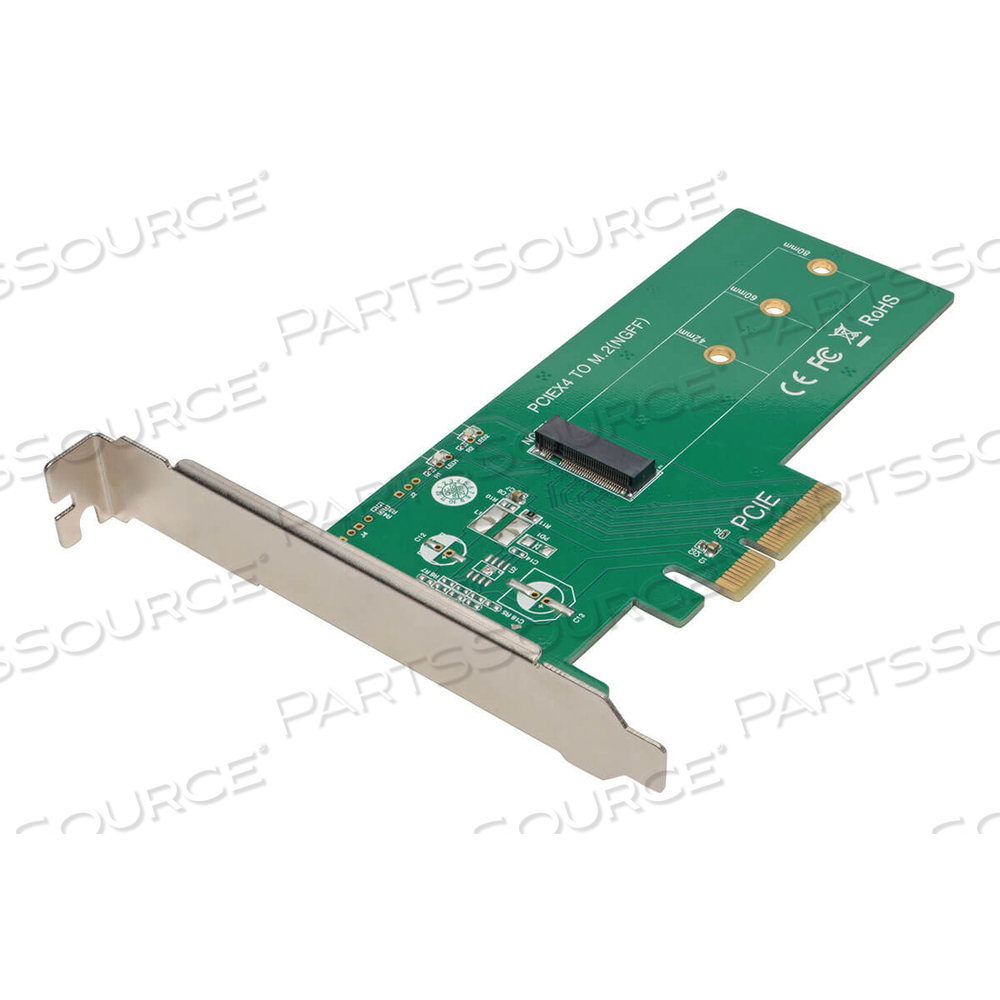
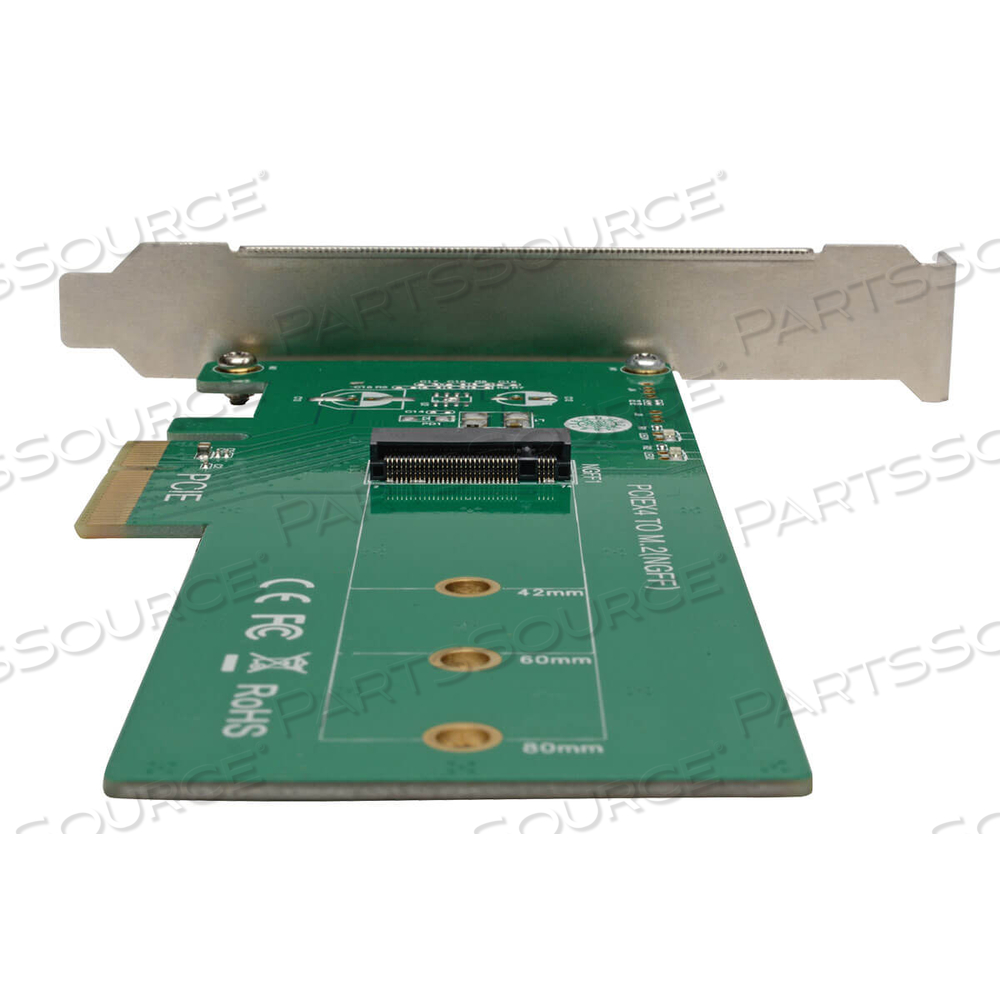
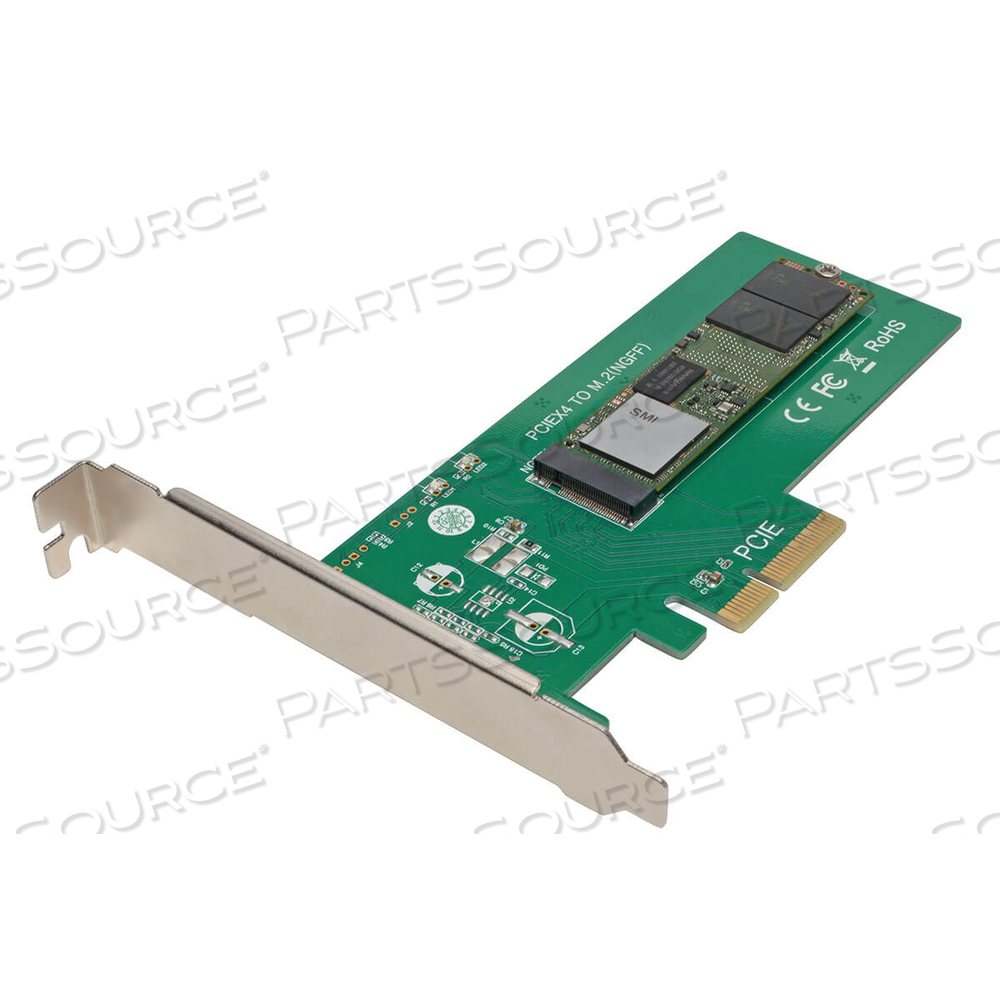
The high-performance PCE-1M2-PX4 M.2 NGFF PCIe SSD (M-Key) PCI Express Card enhances your computer’s speed and increases the amount of internal storage by adding an M.2 PCI Express (PCIe) SSD (M-Key) drive. You can add an ultra-fast four-lane M.2 SSD, such as a Samsung 950 Pro or Samsung SM 951, to a computer or server with an available x4, x8 or x16 PCI Express expansion slot.This lets you keep your operating system on your M.2 PCIe drive, while using larger platter drives for bulk storage. Its plug-and-play design requires no software, driver or external power supply, so setting up the card is easy enough. Just connect your drive to the PCE-1M2-PX4, and insert the unit inside your computer’s PCIe expansion slot.The PCE-1M2-PX4 supports 2242, 2260 and 2280 M.2 drive types up to 80 millimeters. It’s compatible with PCIe 3.0 motherboards and backward compatible with PCIe 2.0 and PCIe 1.0. Works with Windows and Mac computers.
- System Requirements:
• Computer with PCIe expansion slot (x4, x8, x16)
• M.2 NGFF PCIe drive with M-Key or B+M-Key connector (not compatible with M.2 NGFF SATA SSDs)
• Supports 2242, 2260 and 2280 M.2 drive types
• Windows® (XP and later) or Mac® (OS X 10.0 and later) operating system
- Package Includes:
• PCE-1M2-PX4 M.2 NGFF PCIe SSD (M-Key) PCI Express Card
• (2) Screws
• SSD standoff nut
• Owner’s manual
Features
- Backward compatible with PCIe 2.0 and PCIe 1.0
- Compatible with x4, x8 and x16 PCIe expansion slots
- Plug and play-no software, drivers or power supply needed
- Supports 2242, 2260 and 2280 M.2 drive types
- Works with PCIe 3.0 motherboards
Technical Specs
P/N: PCE-1M2-PX4 Key Specs
Item
M.2 NGFF PCIE SSD (M-KEY) PCI EXPRESS X4 CARD
OEM
Tripp Lite
OEM #
PCE-1M2-PX4
Condition
New OEM Original
Returnable
No
Warranty
Other (See Notes)
Bus Type
PCIe 3.0 x4
Expansion Bays
1 x internal - M.2 NGFF
Interface
M.2 Card
Maximum Storage Device Quantity
1
Supported Devices
Solid state drive
Equivalents
The high-performance PCE-1M2-PX4 M.2 NGFF PCIe SSD (M-Key) PCI Express Card enhances your computer’s speed and increases the amount of internal storage by adding an M.2 PCI Express (PCIe) SSD (M-Key) drive. You can add an ultra-fast four-lane M.2 SSD, such as a Samsung 950 Pro or Samsung SM 951, to a computer or server with an available x4, x8 or x16 PCI Express expansion slot.This lets you keep your operating system on your M.2 PCIe drive, while using larger platter drives for bulk storage. Its plug-and-play design requires no software, driver or external power supply, so setting up the card is easy enough. Just connect your drive to the PCE-1M2-PX4, and insert the unit inside your computer’s PCIe expansion slot.The PCE-1M2-PX4 supports 2242, 2260 and 2280 M.2 drive types up to 80 millimeters. It’s compatible with PCIe 3.0 motherboards and backward compatible with PCIe 2.0 and PCIe 1.0. Works with Windows and Mac computers.
- System Requirements:
• Computer with PCIe expansion slot (x4, x8, x16)
• M.2 NGFF PCIe drive with M-Key or B+M-Key connector (not compatible with M.2 NGFF SATA SSDs)
• Supports 2242, 2260 and 2280 M.2 drive types
• Windows® (XP and later) or Mac® (OS X 10.0 and later) operating system
- Package Includes:
• PCE-1M2-PX4 M.2 NGFF PCIe SSD (M-Key) PCI Express Card
• (2) Screws
• SSD standoff nut
• Owner’s manual
- PCE-1M2-PX4: Eaton Corporation: OEM Acquisition
Product Overview
The high-performance PCE-1M2-PX4 M.2 NGFF PCIe SSD (M-Key) PCI Express Card enhances your computer’s speed and increases the amount of internal storage by adding an M.2 PCI Express (PCIe) SSD (M-Key) drive. You can add an ultra-fast four-lane M.2 SSD, such as a Samsung 950 Pro or Samsung SM 951, to a computer or server with an available x4, x8 or x16 PCI Express expansion slot.This lets you keep your operating system on your M.2 PCIe drive, while using larger platter drives for bulk storage. Its plug-and-play design requires no software, driver or external power supply, so setting up the card is easy enough. Just connect your drive to the PCE-1M2-PX4, and insert the unit inside your computer’s PCIe expansion slot.The PCE-1M2-PX4 supports 2242, 2260 and 2280 M.2 drive types up to 80 millimeters. It’s compatible with PCIe 3.0 motherboards and backward compatible with PCIe 2.0 and PCIe 1.0. Works with Windows and Mac computers.
- System Requirements:
• Computer with PCIe expansion slot (x4, x8, x16)
• M.2 NGFF PCIe drive with M-Key or B+M-Key connector (not compatible with M.2 NGFF SATA SSDs)
• Supports 2242, 2260 and 2280 M.2 drive types
• Windows® (XP and later) or Mac® (OS X 10.0 and later) operating system
- Package Includes:
• PCE-1M2-PX4 M.2 NGFF PCIe SSD (M-Key) PCI Express Card
• (2) Screws
• SSD standoff nut
• Owner’s manual
Features
- Backward compatible with PCIe 2.0 and PCIe 1.0
- Compatible with x4, x8 and x16 PCIe expansion slots
- Plug and play-no software, drivers or power supply needed
- Supports 2242, 2260 and 2280 M.2 drive types
- Works with PCIe 3.0 motherboards
Technical Specs
P/N: PCE-1M2-PX4 Key Specs
Item
M.2 NGFF PCIE SSD (M-KEY) PCI EXPRESS X4 CARD
OEM
Tripp Lite
OEM #
PCE-1M2-PX4
Condition
New OEM Original
Returnable
No
Warranty
Other (See Notes)
Bus Type
PCIe 3.0 x4
Expansion Bays
1 x internal - M.2 NGFF
Interface
M.2 Card
Maximum Storage Device Quantity
1
Supported Devices
Solid state drive
Equivalents
The high-performance PCE-1M2-PX4 M.2 NGFF PCIe SSD (M-Key) PCI Express Card enhances your computer’s speed and increases the amount of internal storage by adding an M.2 PCI Express (PCIe) SSD (M-Key) drive. You can add an ultra-fast four-lane M.2 SSD, such as a Samsung 950 Pro or Samsung SM 951, to a computer or server with an available x4, x8 or x16 PCI Express expansion slot.This lets you keep your operating system on your M.2 PCIe drive, while using larger platter drives for bulk storage. Its plug-and-play design requires no software, driver or external power supply, so setting up the card is easy enough. Just connect your drive to the PCE-1M2-PX4, and insert the unit inside your computer’s PCIe expansion slot.The PCE-1M2-PX4 supports 2242, 2260 and 2280 M.2 drive types up to 80 millimeters. It’s compatible with PCIe 3.0 motherboards and backward compatible with PCIe 2.0 and PCIe 1.0. Works with Windows and Mac computers.
- System Requirements:
• Computer with PCIe expansion slot (x4, x8, x16)
• M.2 NGFF PCIe drive with M-Key or B+M-Key connector (not compatible with M.2 NGFF SATA SSDs)
• Supports 2242, 2260 and 2280 M.2 drive types
• Windows® (XP and later) or Mac® (OS X 10.0 and later) operating system
- Package Includes:
• PCE-1M2-PX4 M.2 NGFF PCIe SSD (M-Key) PCI Express Card
• (2) Screws
• SSD standoff nut
• Owner’s manual
- PCE-1M2-PX4: Eaton Corporation: OEM Acquisition
Product Overview
The high-performance PCE-1M2-PX4 M.2 NGFF PCIe SSD (M-Key) PCI Express Card enhances your computer’s speed and increases the amount of internal storage by adding an M.2 PCI Express (PCIe) SSD (M-Key) drive. You can add an ultra-fast four-lane M.2 SSD, such as a Samsung 950 Pro or Samsung SM 951, to a computer or server with an available x4, x8 or x16 PCI Express expansion slot.This lets you keep your operating system on your M.2 PCIe drive, while using larger platter drives for bulk storage. Its plug-and-play design requires no software, driver or external power supply, so setting up the card is easy enough. Just connect your drive to the PCE-1M2-PX4, and insert the unit inside your computer’s PCIe expansion slot.The PCE-1M2-PX4 supports 2242, 2260 and 2280 M.2 drive types up to 80 millimeters. It’s compatible with PCIe 3.0 motherboards and backward compatible with PCIe 2.0 and PCIe 1.0. Works with Windows and Mac computers.
- System Requirements:
• Computer with PCIe expansion slot (x4, x8, x16)
• M.2 NGFF PCIe drive with M-Key or B+M-Key connector (not compatible with M.2 NGFF SATA SSDs)
• Supports 2242, 2260 and 2280 M.2 drive types
• Windows® (XP and later) or Mac® (OS X 10.0 and later) operating system
- Package Includes:
• PCE-1M2-PX4 M.2 NGFF PCIe SSD (M-Key) PCI Express Card
• (2) Screws
• SSD standoff nut
• Owner’s manual
Features
- Backward compatible with PCIe 2.0 and PCIe 1.0
- Compatible with x4, x8 and x16 PCIe expansion slots
- Plug and play-no software, drivers or power supply needed
- Supports 2242, 2260 and 2280 M.2 drive types
- Works with PCIe 3.0 motherboards
Technical Specs
P/N: PCE-1M2-PX4 Key Specs
Item
M.2 NGFF PCIE SSD (M-KEY) PCI EXPRESS X4 CARD
OEM
Tripp Lite
OEM #
PCE-1M2-PX4
Condition
New OEM Original
Returnable
No
Warranty
Other (See Notes)
Bus Type
PCIe 3.0 x4
Expansion Bays
1 x internal - M.2 NGFF
Interface
M.2 Card
Maximum Storage Device Quantity
1
Supported Devices
Solid state drive
Equivalents
The high-performance PCE-1M2-PX4 M.2 NGFF PCIe SSD (M-Key) PCI Express Card enhances your computer’s speed and increases the amount of internal storage by adding an M.2 PCI Express (PCIe) SSD (M-Key) drive. You can add an ultra-fast four-lane M.2 SSD, such as a Samsung 950 Pro or Samsung SM 951, to a computer or server with an available x4, x8 or x16 PCI Express expansion slot.This lets you keep your operating system on your M.2 PCIe drive, while using larger platter drives for bulk storage. Its plug-and-play design requires no software, driver or external power supply, so setting up the card is easy enough. Just connect your drive to the PCE-1M2-PX4, and insert the unit inside your computer’s PCIe expansion slot.The PCE-1M2-PX4 supports 2242, 2260 and 2280 M.2 drive types up to 80 millimeters. It’s compatible with PCIe 3.0 motherboards and backward compatible with PCIe 2.0 and PCIe 1.0. Works with Windows and Mac computers.
- System Requirements:
• Computer with PCIe expansion slot (x4, x8, x16)
• M.2 NGFF PCIe drive with M-Key or B+M-Key connector (not compatible with M.2 NGFF SATA SSDs)
• Supports 2242, 2260 and 2280 M.2 drive types
• Windows® (XP and later) or Mac® (OS X 10.0 and later) operating system
- Package Includes:
• PCE-1M2-PX4 M.2 NGFF PCIe SSD (M-Key) PCI Express Card
• (2) Screws
• SSD standoff nut
• Owner’s manual
- PCE-1M2-PX4: Eaton Corporation: OEM Acquisition