
OEM#: PS0001UA1PRPNew OEM Original Outright
DYNADOCK, DOCKING STATION, USB-C, VGA, HDMI, GIGE, FOR TOSHIBA PORTTGT X30L, X40, X40L, TOSHIBA SATELLITE PRO C40 by Toshiba (Consumer Electronics)
Your price:
$102.09 each
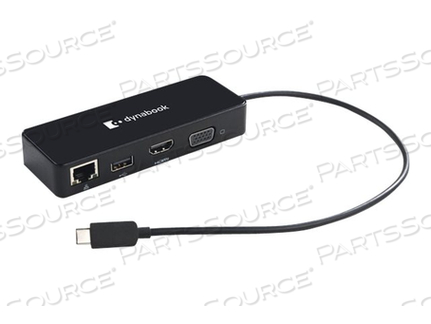
OEM#: PS0001UA1PRPDYNADOCK, DOCKING STATION, USB-C, VGA, HDMI, GIGE, FOR TOSHIBA PORTTGT X30L, X40, X40L, TOSHIBA SATELLITE PRO C40 by Toshiba (Consumer Electronics)
New OEM Original Outright
Your price:
$102.09 each
Dynabook Dynadock - docking station - USB-C - VGA, HDMI - GigE
Asset Information
Are you an existing customer? Sign in to access your account.
ADD TO LIST
Product Overview
Enhance your computer capabilities by connecting an external monitor and other peripherals to your computer's USB Type-C port with this adapter.
You can also charge your computer by connecting the original AC adapter to the USB Type-C Adapter.
Technical Specs
P/N: PS0001UA1PRP Key Specs
Item
DYNADOCK, DOCKING STATION, USB-C, VGA, HDMI, GIGE, FOR TOSHIBA PORTTGT X30L, X40, X40L, TOSHIBA SATELLITE PRO C40
OEM
Toshiba (Consumer Electronics)
OEM #
PS0001UA1PRP
Condition
New OEM Original
Returnable
No
Warranty
Mfr Warranty
Color
Black
Designed For
Toshiba PortTgT X30L-J-19W, X40L-K, X40L-K-102, X40L-K-104, X40L-K-105, X40L-K-10M, X40L-K-10N, X40L-K-10O; Toshiba Satellite Pro C40-G-120
Dimensions (WxDxH)
4.8 in x 1.8 in x 0.8 in
Docking Interface
USB-C
Networking
Gigabit Ethernet
Video Interfaces
VGA, HDMI
Enhance your computer capabilities by connecting an external monitor and other peripherals to your computer's USB Type-C port with this adapter.
You can also charge your computer by connecting the original AC adapter to the USB Type-C Adapter.
Product Overview
Enhance your computer capabilities by connecting an external monitor and other peripherals to your computer's USB Type-C port with this adapter.
You can also charge your computer by connecting the original AC adapter to the USB Type-C Adapter.
Technical Specs
P/N: PS0001UA1PRP Key Specs
Item
DYNADOCK, DOCKING STATION, USB-C, VGA, HDMI, GIGE, FOR TOSHIBA PORTTGT X30L, X40, X40L, TOSHIBA SATELLITE PRO C40
OEM
Toshiba (Consumer Electronics)
OEM #
PS0001UA1PRP
Condition
New OEM Original
Returnable
No
Warranty
Mfr Warranty
Color
Black
Designed For
Toshiba PortTgT X30L-J-19W, X40L-K, X40L-K-102, X40L-K-104, X40L-K-105, X40L-K-10M, X40L-K-10N, X40L-K-10O; Toshiba Satellite Pro C40-G-120
Dimensions (WxDxH)
4.8 in x 1.8 in x 0.8 in
Docking Interface
USB-C
Networking
Gigabit Ethernet
Video Interfaces
VGA, HDMI
Enhance your computer capabilities by connecting an external monitor and other peripherals to your computer's USB Type-C port with this adapter.
You can also charge your computer by connecting the original AC adapter to the USB Type-C Adapter.
Product Overview
Enhance your computer capabilities by connecting an external monitor and other peripherals to your computer's USB Type-C port with this adapter.
You can also charge your computer by connecting the original AC adapter to the USB Type-C Adapter.
Technical Specs
P/N: PS0001UA1PRP Key Specs
Item
DYNADOCK, DOCKING STATION, USB-C, VGA, HDMI, GIGE, FOR TOSHIBA PORTTGT X30L, X40, X40L, TOSHIBA SATELLITE PRO C40
OEM
Toshiba (Consumer Electronics)
OEM #
PS0001UA1PRP
Condition
New OEM Original
Returnable
No
Warranty
Mfr Warranty
Color
Black
Designed For
Toshiba PortTgT X30L-J-19W, X40L-K, X40L-K-102, X40L-K-104, X40L-K-105, X40L-K-10M, X40L-K-10N, X40L-K-10O; Toshiba Satellite Pro C40-G-120
Dimensions (WxDxH)
4.8 in x 1.8 in x 0.8 in
Docking Interface
USB-C
Networking
Gigabit Ethernet
Video Interfaces
VGA, HDMI
Enhance your computer capabilities by connecting an external monitor and other peripherals to your computer's USB Type-C port with this adapter.
You can also charge your computer by connecting the original AC adapter to the USB Type-C Adapter.
