
OEM#: OWCDDMM10CL0GBNew OEM Original Outright
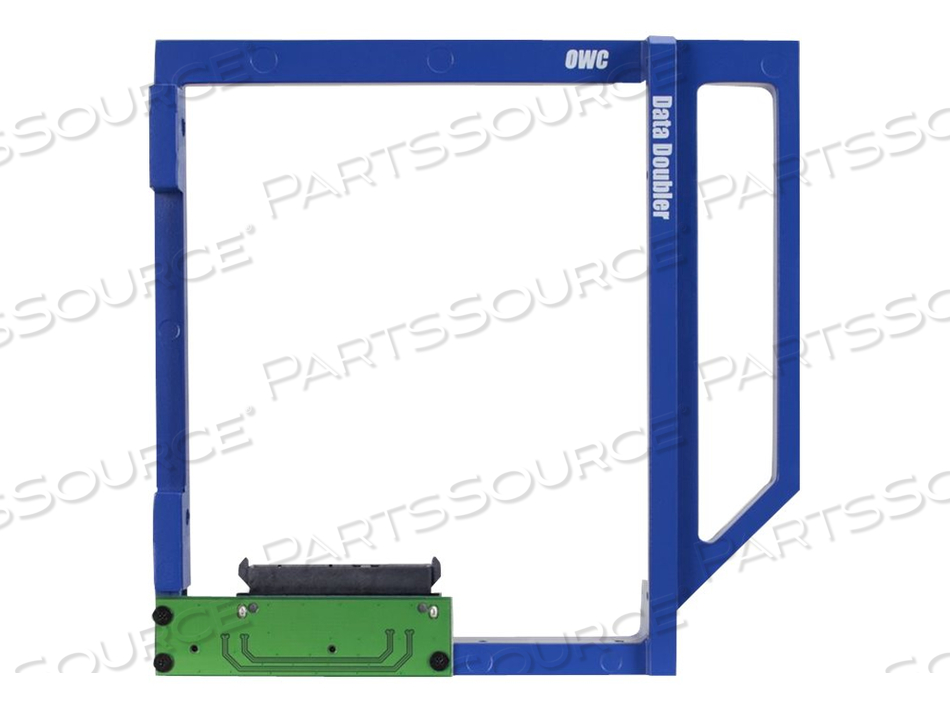
OWC DATA DOUBLER, STORAGE DRIVE CARRIER (CADDY), 5.25" TO 2 X 2.5", FOR APPLE MAC MINI (MID 2010) by Other World Computing, Inc.
Your price:
$29.93 each $29.99 Savings: $0.06 (0%)

OEM#: OWCDDMM10CL0GBOWC DATA DOUBLER, STORAGE DRIVE CARRIER (CADDY), 5.25" TO 2 X 2.5", FOR APPLE MAC MINI (MID 2010) by Other World Computing, Inc.
New OEM Original Outright
Your price:
$29.93 each
$29.99 Savings: $0.06 (0%)
OWC Data Doubler - storage drive carrier (caddy)
Asset Information
Are you an existing customer? Sign in to access your account.
ADD TO LIST
Product Overview
Boost your storage capacity by adding a second hard drive, or enjoy near-instantaneous boot and app loading times by adding a Solid State Drive (SSD).
Configuration flexibility is yours when you replace your 2010 Mac mini's internal SuperDrive with an OWC Data Doubler with a hard drive or SSD. The custom-engineered Data Doubler bracket comes ready to mount any 2.5" SATA drive up to 12.5mm in height.
Once you've installed the entire Data Doubler drive assembly into your 2010 Mac mini's optical drive bay, you can customize how you want your internal storage to perform. Drive customization is easy and built right into OS X as the new Data Doubler mounted drive can be setup using Apple's Disk Utility program in which you can format the drive, create a RAID array using two drives together, or partition the new drive. Once formatted you can also setup the second drive as a Time Machine backup so you can take your backup with your wherever you go.
OWC provides free installation videos that guide this DIY upgrade step-by-step for each specific Mac model. Data Doubler also comes backed by OWC's award-winning U.S.A. based technical support team which is readily available to assist you with your upgrade should you have any questions.
Configuration flexibility is yours when you replace your 2010 Mac mini's internal SuperDrive with an OWC Data Doubler with a hard drive or SSD. The custom-engineered Data Doubler bracket comes ready to mount any 2.5" SATA drive up to 12.5mm in height.
Once you've installed the entire Data Doubler drive assembly into your 2010 Mac mini's optical drive bay, you can customize how you want your internal storage to perform. Drive customization is easy and built right into OS X as the new Data Doubler mounted drive can be setup using Apple's Disk Utility program in which you can format the drive, create a RAID array using two drives together, or partition the new drive. Once formatted you can also setup the second drive as a Time Machine backup so you can take your backup with your wherever you go.
OWC provides free installation videos that guide this DIY upgrade step-by-step for each specific Mac model. Data Doubler also comes backed by OWC's award-winning U.S.A. based technical support team which is readily available to assist you with your upgrade should you have any questions.
Technical Specs
P/N: OWCDDMM10CL0GB Key Specs
Item
OWC DATA DOUBLER, STORAGE DRIVE CARRIER (CADDY), 5.25" TO 2 X 2.5", FOR APPLE MAC MINI (MID 2010)
OEM
Other World Computing, Inc.
OEM #
OWCDDMM10CL0GB
Condition
New OEM Original
Returnable
No
Warranty
Mfr Warranty
Compatible Bay
1 5.25
Designed For
Apple Mac mini (Mid 2010)
Device Type
Storage drive carrier (caddy)
Dimensions (W x D x H)
5 in x 4.1 in x 0.5 in
Supported Form Factor
5.25" to 2 x 2.5
Weight
2.24 oz
Boost your storage capacity by adding a second hard drive, or enjoy near-instantaneous boot and app loading times by adding a Solid State Drive (SSD).
Configuration flexibility is yours when you replace your 2010 Mac mini's internal SuperDrive with an OWC Data Doubler with a hard drive or SSD. The custom-engineered Data Doubler bracket comes ready to mount any 2.5" SATA drive up to 12.5mm in height.
Once you've installed the entire Data Doubler drive assembly into your 2010 Mac mini's optical drive bay, you can customize how you want your internal storage to perform. Drive customization is easy and built right into OS X as the new Data Doubler mounted drive can be setup using Apple's Disk Utility program in which you can format the drive, create a RAID array using two drives together, or partition the new drive. Once formatted you can also setup the second drive as a Time Machine backup so you can take your backup with your wherever you go.
OWC provides free installation videos that guide this DIY upgrade step-by-step for each specific Mac model. Data Doubler also comes backed by OWC's award-winning U.S.A. based technical support team which is readily available to assist you with your upgrade should you have any questions.
Configuration flexibility is yours when you replace your 2010 Mac mini's internal SuperDrive with an OWC Data Doubler with a hard drive or SSD. The custom-engineered Data Doubler bracket comes ready to mount any 2.5" SATA drive up to 12.5mm in height.
Once you've installed the entire Data Doubler drive assembly into your 2010 Mac mini's optical drive bay, you can customize how you want your internal storage to perform. Drive customization is easy and built right into OS X as the new Data Doubler mounted drive can be setup using Apple's Disk Utility program in which you can format the drive, create a RAID array using two drives together, or partition the new drive. Once formatted you can also setup the second drive as a Time Machine backup so you can take your backup with your wherever you go.
OWC provides free installation videos that guide this DIY upgrade step-by-step for each specific Mac model. Data Doubler also comes backed by OWC's award-winning U.S.A. based technical support team which is readily available to assist you with your upgrade should you have any questions.
Product Overview
Boost your storage capacity by adding a second hard drive, or enjoy near-instantaneous boot and app loading times by adding a Solid State Drive (SSD).
Configuration flexibility is yours when you replace your 2010 Mac mini's internal SuperDrive with an OWC Data Doubler with a hard drive or SSD. The custom-engineered Data Doubler bracket comes ready to mount any 2.5" SATA drive up to 12.5mm in height.
Once you've installed the entire Data Doubler drive assembly into your 2010 Mac mini's optical drive bay, you can customize how you want your internal storage to perform. Drive customization is easy and built right into OS X as the new Data Doubler mounted drive can be setup using Apple's Disk Utility program in which you can format the drive, create a RAID array using two drives together, or partition the new drive. Once formatted you can also setup the second drive as a Time Machine backup so you can take your backup with your wherever you go.
OWC provides free installation videos that guide this DIY upgrade step-by-step for each specific Mac model. Data Doubler also comes backed by OWC's award-winning U.S.A. based technical support team which is readily available to assist you with your upgrade should you have any questions.
Configuration flexibility is yours when you replace your 2010 Mac mini's internal SuperDrive with an OWC Data Doubler with a hard drive or SSD. The custom-engineered Data Doubler bracket comes ready to mount any 2.5" SATA drive up to 12.5mm in height.
Once you've installed the entire Data Doubler drive assembly into your 2010 Mac mini's optical drive bay, you can customize how you want your internal storage to perform. Drive customization is easy and built right into OS X as the new Data Doubler mounted drive can be setup using Apple's Disk Utility program in which you can format the drive, create a RAID array using two drives together, or partition the new drive. Once formatted you can also setup the second drive as a Time Machine backup so you can take your backup with your wherever you go.
OWC provides free installation videos that guide this DIY upgrade step-by-step for each specific Mac model. Data Doubler also comes backed by OWC's award-winning U.S.A. based technical support team which is readily available to assist you with your upgrade should you have any questions.
Technical Specs
P/N: OWCDDMM10CL0GB Key Specs
Item
OWC DATA DOUBLER, STORAGE DRIVE CARRIER (CADDY), 5.25" TO 2 X 2.5", FOR APPLE MAC MINI (MID 2010)
OEM
Other World Computing, Inc.
OEM #
OWCDDMM10CL0GB
Condition
New OEM Original
Returnable
No
Warranty
Mfr Warranty
Compatible Bay
1 5.25
Designed For
Apple Mac mini (Mid 2010)
Device Type
Storage drive carrier (caddy)
Dimensions (W x D x H)
5 in x 4.1 in x 0.5 in
Supported Form Factor
5.25" to 2 x 2.5
Weight
2.24 oz
Boost your storage capacity by adding a second hard drive, or enjoy near-instantaneous boot and app loading times by adding a Solid State Drive (SSD).
Configuration flexibility is yours when you replace your 2010 Mac mini's internal SuperDrive with an OWC Data Doubler with a hard drive or SSD. The custom-engineered Data Doubler bracket comes ready to mount any 2.5" SATA drive up to 12.5mm in height.
Once you've installed the entire Data Doubler drive assembly into your 2010 Mac mini's optical drive bay, you can customize how you want your internal storage to perform. Drive customization is easy and built right into OS X as the new Data Doubler mounted drive can be setup using Apple's Disk Utility program in which you can format the drive, create a RAID array using two drives together, or partition the new drive. Once formatted you can also setup the second drive as a Time Machine backup so you can take your backup with your wherever you go.
OWC provides free installation videos that guide this DIY upgrade step-by-step for each specific Mac model. Data Doubler also comes backed by OWC's award-winning U.S.A. based technical support team which is readily available to assist you with your upgrade should you have any questions.
Configuration flexibility is yours when you replace your 2010 Mac mini's internal SuperDrive with an OWC Data Doubler with a hard drive or SSD. The custom-engineered Data Doubler bracket comes ready to mount any 2.5" SATA drive up to 12.5mm in height.
Once you've installed the entire Data Doubler drive assembly into your 2010 Mac mini's optical drive bay, you can customize how you want your internal storage to perform. Drive customization is easy and built right into OS X as the new Data Doubler mounted drive can be setup using Apple's Disk Utility program in which you can format the drive, create a RAID array using two drives together, or partition the new drive. Once formatted you can also setup the second drive as a Time Machine backup so you can take your backup with your wherever you go.
OWC provides free installation videos that guide this DIY upgrade step-by-step for each specific Mac model. Data Doubler also comes backed by OWC's award-winning U.S.A. based technical support team which is readily available to assist you with your upgrade should you have any questions.
Product Overview
Boost your storage capacity by adding a second hard drive, or enjoy near-instantaneous boot and app loading times by adding a Solid State Drive (SSD).
Configuration flexibility is yours when you replace your 2010 Mac mini's internal SuperDrive with an OWC Data Doubler with a hard drive or SSD. The custom-engineered Data Doubler bracket comes ready to mount any 2.5" SATA drive up to 12.5mm in height.
Once you've installed the entire Data Doubler drive assembly into your 2010 Mac mini's optical drive bay, you can customize how you want your internal storage to perform. Drive customization is easy and built right into OS X as the new Data Doubler mounted drive can be setup using Apple's Disk Utility program in which you can format the drive, create a RAID array using two drives together, or partition the new drive. Once formatted you can also setup the second drive as a Time Machine backup so you can take your backup with your wherever you go.
OWC provides free installation videos that guide this DIY upgrade step-by-step for each specific Mac model. Data Doubler also comes backed by OWC's award-winning U.S.A. based technical support team which is readily available to assist you with your upgrade should you have any questions.
Configuration flexibility is yours when you replace your 2010 Mac mini's internal SuperDrive with an OWC Data Doubler with a hard drive or SSD. The custom-engineered Data Doubler bracket comes ready to mount any 2.5" SATA drive up to 12.5mm in height.
Once you've installed the entire Data Doubler drive assembly into your 2010 Mac mini's optical drive bay, you can customize how you want your internal storage to perform. Drive customization is easy and built right into OS X as the new Data Doubler mounted drive can be setup using Apple's Disk Utility program in which you can format the drive, create a RAID array using two drives together, or partition the new drive. Once formatted you can also setup the second drive as a Time Machine backup so you can take your backup with your wherever you go.
OWC provides free installation videos that guide this DIY upgrade step-by-step for each specific Mac model. Data Doubler also comes backed by OWC's award-winning U.S.A. based technical support team which is readily available to assist you with your upgrade should you have any questions.
Technical Specs
P/N: OWCDDMM10CL0GB Key Specs
Item
OWC DATA DOUBLER, STORAGE DRIVE CARRIER (CADDY), 5.25" TO 2 X 2.5", FOR APPLE MAC MINI (MID 2010)
OEM
Other World Computing, Inc.
OEM #
OWCDDMM10CL0GB
Condition
New OEM Original
Returnable
No
Warranty
Mfr Warranty
Compatible Bay
1 5.25
Designed For
Apple Mac mini (Mid 2010)
Device Type
Storage drive carrier (caddy)
Dimensions (W x D x H)
5 in x 4.1 in x 0.5 in
Supported Form Factor
5.25" to 2 x 2.5
Weight
2.24 oz
Boost your storage capacity by adding a second hard drive, or enjoy near-instantaneous boot and app loading times by adding a Solid State Drive (SSD).
Configuration flexibility is yours when you replace your 2010 Mac mini's internal SuperDrive with an OWC Data Doubler with a hard drive or SSD. The custom-engineered Data Doubler bracket comes ready to mount any 2.5" SATA drive up to 12.5mm in height.
Once you've installed the entire Data Doubler drive assembly into your 2010 Mac mini's optical drive bay, you can customize how you want your internal storage to perform. Drive customization is easy and built right into OS X as the new Data Doubler mounted drive can be setup using Apple's Disk Utility program in which you can format the drive, create a RAID array using two drives together, or partition the new drive. Once formatted you can also setup the second drive as a Time Machine backup so you can take your backup with your wherever you go.
OWC provides free installation videos that guide this DIY upgrade step-by-step for each specific Mac model. Data Doubler also comes backed by OWC's award-winning U.S.A. based technical support team which is readily available to assist you with your upgrade should you have any questions.
Configuration flexibility is yours when you replace your 2010 Mac mini's internal SuperDrive with an OWC Data Doubler with a hard drive or SSD. The custom-engineered Data Doubler bracket comes ready to mount any 2.5" SATA drive up to 12.5mm in height.
Once you've installed the entire Data Doubler drive assembly into your 2010 Mac mini's optical drive bay, you can customize how you want your internal storage to perform. Drive customization is easy and built right into OS X as the new Data Doubler mounted drive can be setup using Apple's Disk Utility program in which you can format the drive, create a RAID array using two drives together, or partition the new drive. Once formatted you can also setup the second drive as a Time Machine backup so you can take your backup with your wherever you go.
OWC provides free installation videos that guide this DIY upgrade step-by-step for each specific Mac model. Data Doubler also comes backed by OWC's award-winning U.S.A. based technical support team which is readily available to assist you with your upgrade should you have any questions.